プロダクツ
捜索

オンラインサービス
| 予備部品(24 H)-フィオナ |  |
| 装備-リー | |
| メンテナンス消耗品-ジェシカ | |


| 予備部品(24 H)-フィオナ | |
| 装備-リー | |
| メンテナンス消耗品-ジェシカ | |
この投稿では, I’ll break down everything: Who needs it, what it does, why it matters, and how to use it like a pro. プラス, I’ll share compatibility tips and common mistakes to avoid.
If you’re running SMT production lines for industries like:
Automotive electronics (traceability is law here)
Medical devices (FDA requires full lifecycle tracking)
Industrial control systems (where uptime matters)
…then this is for you.
Still using manual labeling after reflow? That’s a bottleneck. Labels get crooked, operators miss parts, and you waste hours reworking boards.
A Yamaha Label Feeder lets your existing SMT machine apply labels during placement, so your operators don’t waste time later.
Compatible Machines? Oh, we’ve got a long list:
✅ ヤマハ – YS12, YS24, YSM10, YSM20, YRM20
✅ パナソニック – CM402, CM602 ·, NPMの
✅ 富士 – NXT M3/M6/M6S, XPF
✅ Samsung Hanwha – SM471, SM482の
✅ 万国 – GC/GI/AC, Fuzion
✅ 日立 – GXH-1S, GXH-3, SIGMA G5S
✅ ティッカー – D series, TXII, SX1, SX2
If your line uses any of these, you’re golden.
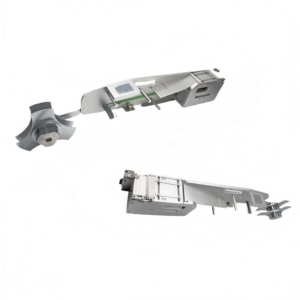


Think of it as a feeder that serves labels instead of components. The SMT machine picks labels like it picks chips, and places them on the PCB with micrometer accuracy.
✔ Automated Labeling – Skip the manual stickering after reflow.
✔ 高精度 – Uses the SMT head for dead-on placement.
✔ Plug-and-Play Integration – No extra power. No complicated protocols. Just connect to the vibratory feeder port and set it as a Tray Feeder in the machine.
Supported Label Sizes:
| Parameter | Range |
|---|---|
| Length/Height | 2–80 mm |
| 厚さ | ≥ 0.05 ミリメートル |
| Backing Width | 4–88 mm |

Simple: 効率, 精度, Compliance.
Yamaha YSM20 can hit 30,000 ティッカー. Humans can’t keep up. Automating labeling shaves minutes (or hours) off every batch.
Labels carry serial numbers, barcodes, and lot codes. Automotive and medical standards require this. Skip it, and you risk non-compliance penalties.
Manual work means crooked labels, missed boards, and rework. That’s expensive.
No extra labeling machine. The SMT line does it all.
Match your SMT machine model and feeder slot width (usually 8mm/12mm).
Use high-temp labels (polyimide) so they survive reflow.
Confirm size fits feeder spec (2–80 mm).
Configure pickup height そして placement pressure.
Run peel tests to avoid misfeeds.
Clean peel blades and rollers to remove adhesive build-up.
Check for worn feeding gears if labels start jamming.
PCB Identification – Barcodes for MES and traceability.
Component Tagging – Mark large or sensitive components.
盤 & Carrier Labels – Track WIP across stations.
| Factor | Manual Labeling | Label Feeder |
|---|---|---|
| 速度 | Slow (operator-limited) | High-speed (machine-driven) |
| 精度 | Prone to misalignment | Perfect placement |
| Labor Cost | 高い | One-time investment |
| トレーサビリティ | Risky | Guaranteed |
Confirm Feeder Protocol: Yamaha uses vibratory feeder interface. No extra software needed—just signal lines like send label そして label ready.
Plan for Label Rolls: Standard core sizes fit easily, but check diameter limits.
Budget for Training: Even though setup is simple, train operators on peel force adjustments.
Yamaha Label Feeders aren’t a luxury—they’re the next step if you want 速度, 精度, and compliance on your SMT line. Instead of wasting time on manual labeling, let your pick-and-place do the heavy lifting.
Q1: Can I use this with non-Yamaha machines?
はい! We support Panasonic, 富士, サムスン, 万国, 日立, and ASM models.
Q2: What label materials are best?
Polyimide or other high-temp labels for reflow durability.
Q3: Do I need extra power?
いいえ. It uses the standard feeder interface for power and control.
Q4: How long does setup take?
Usually less than 30 minutes if your machine program is ready.
Q5: Can it handle QR codes?
Absolutely. Any label that fits the size spec works.
🔥 Ready to upgrade your SMT line?
👉 Request a quote now at Feedersmt.com